

AIUS Onboarding
Download PDFWhat is AIUS
AIUS is an autonomous coding agent for working with your data. Bring your data files, transform and analyze them, build ML and AI models, and create decision-ready outputs. Core Capabilities:- Bring Your Data: Work from files you drop into the project — CSV, TSV, Excel (
.xlsx), Parquet, and JSON. Your data stays on your machine and is read by code running locally. - Transformation: Clean, merge, and transform data with natural language
- ML/AI Models: Build, train, and deploy statistical, ML/DL and AI models
- Decision Outputs: Generate dashboards, reports, and actionable insights
- Code Generation: Write production-ready code: Python, SQL, or in any language
- Automation: Orchestrate end-to-end data pipelines with slash commands
- Notebooks & Deliverables: Every analysis is a real Jupyter notebook; runs publish reports, models, and decks to your dashboard
AIUS Client & Data Platform
AIUS Client (TUI) Terminal-based User Interface for autonomous coding, data engineering, analytics, and AI operations AIUS Data Platform
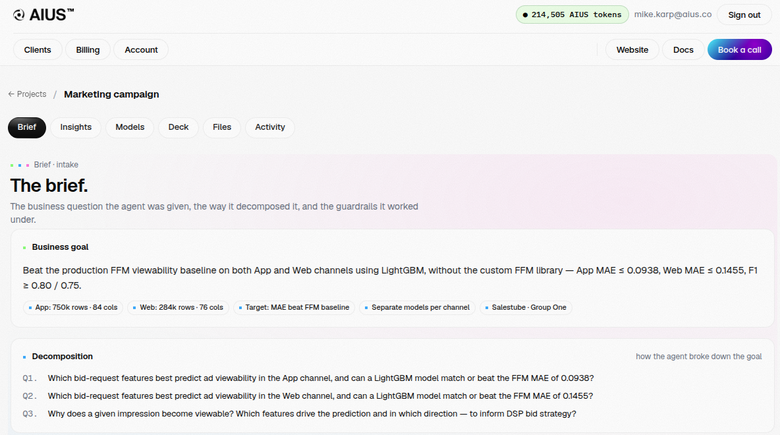
Cloud platform for managing projects, agents, compute, storage, governance, security, billing, and collaboration
AIUS Data Platform
Cloud platform for managing projects, agents, compute, storage, governance, security, billing, and collaboration
Start with the Video Walkthroughs
Begin your AIUS journey with these quick walkthroughs. Quickstart Guide Get started with AIUS in minutes Full Project Demo Explore a complete end-to-end data intelligence workflowSetup & Installation
Prerequisites: macOS, Linux, or Windows with terminal access Account Setup:- Visit aius.co/account/register
- Sign up with email/password or Google OAuth
- Confirm email and copy API key from dashboard
curl -fsSL https://aius.co/install.sh | bash
Alternative Methods: Download binary from aius.co, use package manager (Homebrew, apt), or Docker
Verify: aius --version
Auth file: ~/.local/share/aius/auth.json
Data Platform: Project management, remote agent control, billing, client management, activity logs. Verify at aius.co/account
Launching AIUS from IDEs
AIUS runs as a terminal utility that can be integrated with your preferred development environment: Popular IDEs for Data Professionals:- VS Code - code.visualstudio.com (macOS, Linux, Windows)
- PyCharm - jetbrains.com/pycharm (macOS, Linux, Windows)
- JupyterLab - jupyter.org (macOS, Linux, Windows)
- RStudio - posit.co/rstudio (macOS, Linux, Windows)
- DataGrip - jetbrains.com/datagrip (macOS, Linux, Windows)
- Terminal - Native terminal (macOS, Linux, Windows)
- Cursor - cursor.sh
- Claude - claude.ai
- GitHub Copilot - github.com/features/copilot
- Devin - cognition.ai
- OpenAI Codex - openai.com
aius from your IDE’s integrated terminal or from the system terminal
You’re Ready to Build
Start AIUS:aius
Create Your First Project: make a project directory, put your brief in context/ and your dataset in data/, then run aius in it. To link it to your account, run aius project create.
Re-launch Existing Project: cd my-project && aius
Project Structure: my-project/ with context/, data/, output/, .aius/ directories
Resources: Documentation — docs.aius.co | Support — support@aius.co | Feedback (right-bottom of Data Platform)
Docs: Installation Guide - Detailed setup | CLI Usage - Advanced features | Data Management - Projects, datasets, how-tos
Dashboard Guide: Account, keys, deliverables
Happy building with AIUS!